

In-house content or data
This could be your archive of videos, past results, player performance data or contestants in a TV show. Supply it as a file today, or ask us to set up a custom source.
Gamestage turns an agent-built prototype into a production game. Scale, security and enterprise support for when games matter.
Bring your own agent
Paste this into the agent you already use, or run it yourself.
Take my game to production with Gamestage. Install the skill from gamestage.ai/skill, then run npx gamestage start and follow it.Paste this into Claude Code, Codex, Cursor or any coding agent.













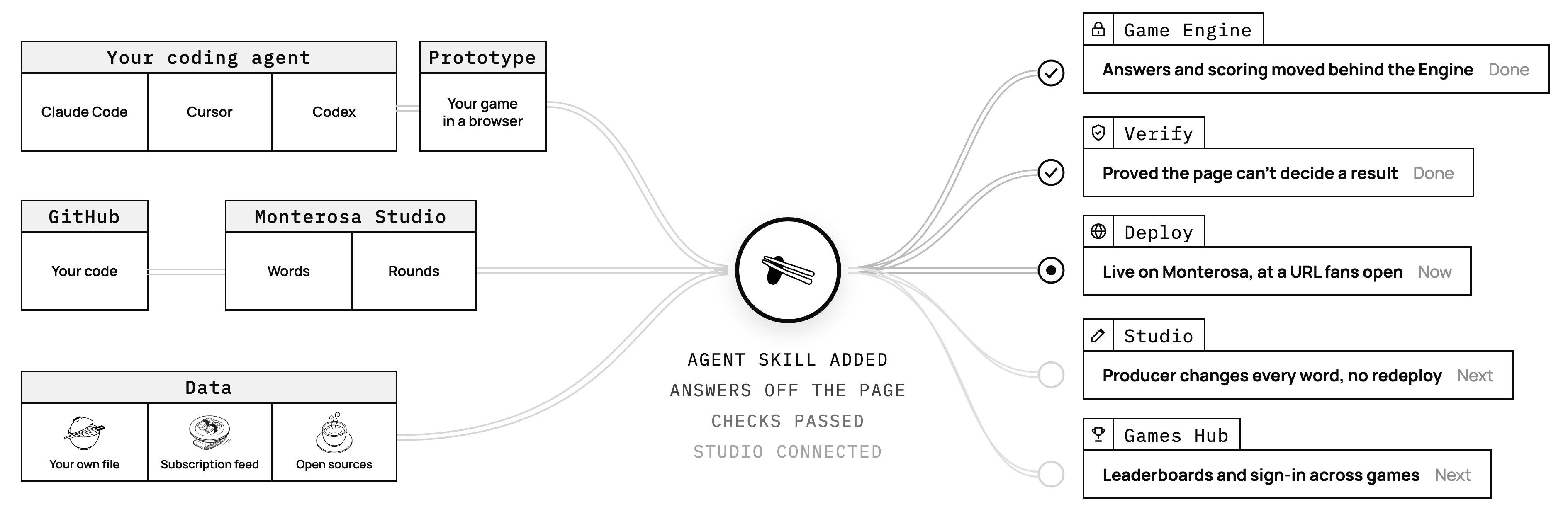
You build the game with your coding agent. Gamestage makes it safe to put in front of fans: the answers and the scoring move behind a Game Engine the page cannot touch. Two of these six steps are yours. Your agent does the rest.
Build me a game where fans pick one player a day and guess their career points.
Claude Code, Cursor, Codex, wherever you already work. A game that runs in a browser, with its answers and its scoring sitting in the page, where any fan can read them.
npx skills add https://gamestage.ai/skillOne line, from the doors above, teaches your agent the whole route. Nothing is installed and there is no account yet.
Get my game on Gamestage.
Say so, in those words. Your agent reads the game, moves the answers and the scoring behind a Game Engine on your own machine, plays it, and proves the page could not have decided the result. Nothing has left your computer.
The one step that has to be you. A browser window opens for your account, new or existing, then GitHub links your code to your workspace. A new account is approved by a person, so this can mean a short wait; email support@monterosa.co if it is taking a while. Your agent waits, and carries on when you are back.
Deploy it.
Your game goes up on Monterosa infrastructure, at a URL a fan can open. From there a producer changes every word a fan reads from Studio, with no redeploy and no engineer.
Change the buttons to our club colours and deploy again.
Say what you want different and deploy again. The checks run every time, and each day's round comes from Studio rather than from your code.
The commands your agent runs at each stop are in the CLI reference.
Your game scores against a dataset that is held on the server and never sent to a fan's browser. It can come from your own files, a feed you license, or an open source.
This could be your archive of videos, past results, player performance data or contestants in a TV show. Supply it as a file today, or ask us to set up a custom source.

Bring your own licensed feed. The contract stays yours, and the values are held on the server and never reach a fan's browser. You push the dataset yourself, on whatever schedule your source updates.

Public and open data sources, each with its own licence to respect. Right for a prototype or a taster. A game with something at stake needs a source with a contract behind it.
Live Graphics
Your leaderboard and a QR code that sends people to the game, on a broadcast overlay, a lower third, a vertical panel in a concourse or a stadium screen. A producer composes the graphic in Monterosa Studio and it follows your game from there, so you write no integration code.
Every address is an ordinary web page, so the systems that drive stadium screens and broadcast graphics, Daktronics and Tagboard among them, take it straight in.
Read how it worksPowered by Monterosa / Live Graphics
Start free. Pay when a game has an audience.
Starter
Build a game and prove it with a small audience.
Accounts must be approved before the first deploy.
Create a free accountPublisher
Put games in front of a real audience, with people to call.
Enterprise
Included in a Monterosa subscription
The games your business runs on, under your Monterosa contract.
Usage subject to your Monterosa usage terms.
Monterosa will build it with you. We shape the infrastructure around what your game needs, rather than bending the game to fit a game format.
It requires a Monterosa subscription, and the work is drawn against service credits.
We make no claims over your game, and we give no guarantees and offer no particular protection for your ideas.
A published game is there to be seen. Treat anything you ship as public.
By default, none. Gamestage carries no SLA below the Enterprise plan.
On Enterprise, the SLA matches your Monterosa subscription and is passed through to third-party games, which carry ring-fenced service commitments.
Everywhere else we support on a reasonable endeavours basis, and you stay responsible for the game's upkeep and performance.
Migrate it, then submit it. A person reads every submission, and the outcome is that team's call.
We cannot promise that any game gets put forward.
Your next game